
Entity Framework Core ER Diagrams
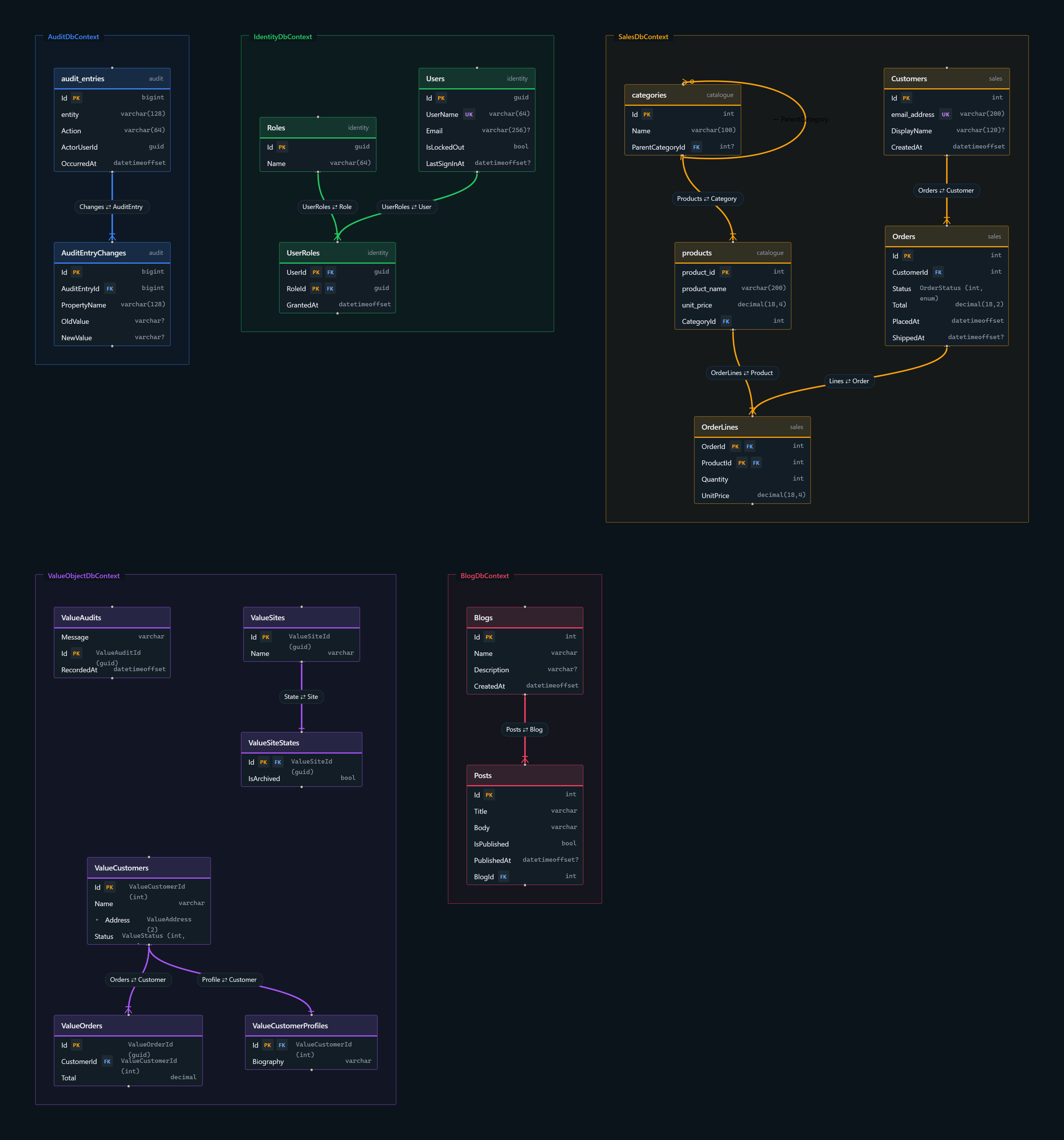
AspireC4.Hosting.EntityFrameworkCore adds a second, optional diagram to AspireC4: a live ER diagram
of your Entity Framework Core DbContext types, hosted beside the architecture diagram and linked from
it.
It is additive — AddAspireC4() is always the base, and WithEntityFrameworkDiagram() adds the ER
diagram to the builder it returns. You can run the architecture diagram on its own and never install this
package; there is no way to run the ER diagram without the architecture diagram.
Packages and target frameworks
Section titled “Packages and target frameworks”| Package | Target framework | Add to | Why |
|---|---|---|---|
AspireC4.Hosting |
net10.0, net11.0 |
the AppHost | the architecture diagram this one hangs off. Required first |
AspireC4.Hosting.EntityFrameworkCore |
net10.0, net11.0 |
the AppHost | the ER diagram itself |
AspireC4.EntityFrameworkCore |
netstandard2.0 (analyzer-only) |
a project you own that declares a DbContext |
captures fluent OnModelCreating configuration |
AspireC4.EntityFrameworkCore.ModelDump |
net10.0 (build-time tool) |
the project that owns the EF Core provider and a design-time factory | the authoritative model, composite foreign keys included |
Both libraries ship net10.0 and net11.0 assets, so an AppHost on either runtime resolves one. The
analyzer package is netstandard2.0 and ships only under analyzers/dotnet/cs/: it adds no runtime
assembly, so it works whatever framework the owning project targets — but it runs inside the compiler,
so the owning project must be built with the .NET 11 SDK. The dump tool is net10.0 and runs as
dotnet <tool>.dll from an MSBuild Exec, rolling forward to the latest installed major runtime, so the
.NET 11 SDK’s runtime is enough and a project that builds net11.0 can be loaded.
Requirements has the detail for both, including what happens when either cannot run.
Enabling it
Section titled “Enabling it”1. Add the package to the AppHost
Section titled “1. Add the package to the AppHost”dotnet add package AspireC4.Hosting.EntityFrameworkCore2. Register the projects that own your DbContext types
Section titled “2. Register the projects that own your DbContext types”The diagram is built from Aspire project resources. Every project added with
AddProject<Projects.X>(...) is scanned for DbContext types, including contexts that live in class
libraries the project references. A project that is only a <ProjectReference>, or that runs as a
container or executable, is not scanned.
3. Call WithEntityFrameworkDiagram()
Section titled “3. Call WithEntityFrameworkDiagram()”var builder = DistributedApplication.CreateBuilder(args);
builder.AddAspireC4() .WithEntityFrameworkDiagram();
builder.AddProject<Projects.Orders_Api>("orders-api");
builder.Build().Run();Run the AppHost. The dashboard shows both diagrams under a shared aspirec4 parent row, each project that
contributed a context gets an ER Diagram link, and the project’s element in the architecture diagram
gets one too. Output is written to ./.aspirec4/erd/ beside the AppHost.
The model is read from each project’s build output (bin/), so a project must have been built before
the AppHost starts. Building the AppHost builds its referenced projects, so normally you do not need to do
anything.
How the model is read
Section titled “How the model is read”Each context is recovered from the best source available, and the diagram records which one was used:
| Source | When | Fidelity |
|---|---|---|
| Dump | the project, or one it references, references AspireC4.EntityFrameworkCore.ModelDump |
Full — the real EF model, value converters and composite foreign keys included |
| Descriptor | the project references the analyzer-only AspireC4.EntityFrameworkCore package |
Full — includes fluent OnModelCreating configuration |
| Metadata | otherwise | Approximate — conventions and data annotations only |
The metadata reader opens the built assembly with a reflection-only load context, so no code runs. It
cannot see OnModelCreating — a method body is absent from metadata — so a project without a package
still appears, but fluent renames, default schemas and Ignore calls do not. A shared or third-party
assembly you cannot instrument contributes at this fidelity.
Every context carries its fidelity in the diagram, so an approximate model is never mistaken for a complete one. When the same context reaches the diagram through several projects, the higher-fidelity description wins.
The build-time dump (opt-in)
Section titled “The build-time dump (opt-in)”Reference AspireC4.EntityFrameworkCore.ModelDump from the project that owns the EF Core provider; that
reference is the opt-in. After every build the tool builds each context’s real IModel through its
IDesignTimeDbContextFactory<T> and writes the diagram contract to obj/aspirec4/ef/. That directory is
never copied to bin/ or publish/ and is gitignored, so the dump has no deployment footprint. The
AppHost reads it from that project and every project it references, and falls back when it is missing or
older than the built assembly.
Set <AspireC4EfModelDumpConnectionString> when the design-time factory needs one to build its options —
the model is never opened, so any syntactically valid value works. A dump failure never fails the build.
Value objects, enums and unions
Section titled “Value objects, enums and unions”A column declared with a domain type shows it beside the real database type — AssetId (guid),
ActorType (int, enum) — as DomainTypeDisplay chooses. This page owns the rules for what is recognised.
| Declared as | Shown as |
|---|---|
Purview [Scalar<T>], [Scalar(typeof(T))], [Scalar("Amount")], IScalarValueObject<TSelf, TValue>, or any non-generic struct with a public Value |
a scalar value object: one column of the wrapped type. A struct or a class |
Nullable<T> of any of those |
the same value object, nullable |
Purview [ValueObject] (its EFMapping defaults to ComplexType), EF’s [ComplexType], ComplexProperty(...), [Owned] or OwnsOne(...) sharing the owner’s table |
a complex value object: {Property}_{Member} columns on the owner’s table, folded under the property in the viewer |
[ValueObject(EFMapping = Json)], OwnsOne(...).ToJson(), a complex collection |
a complex value object in one json column |
List<string>, Guid[], List<AssetId> |
one json column; a collection of value objects or enums shows as AssetId[] |
| an enum | its underlying integral type (tinyint for a byte enum) marked enum, or varchar when converted to a string |
a C# union — union, or a struct marked [Union] / implementing IUnion |
marked union. EF needs a value converter to store one, so the database type is what the converter produces |
OwnsMany(...), or an [Owned] type in a collection |
a table of its own, with a foreign key to its owner |
A member of a complex value object that is itself a scalar value object or an enum keeps its own type,
and still records which property it belongs to, so the viewer groups it correctly. A union is never taken
for a scalar value object, although its Value accessor has the same shape.
Relationships through value objects
Section titled “Relationships through value objects”A foreign key typed with a value object resolves like any other, from either end:
- a reference navigation on the dependent (
Order.Customer), with the key found by[ForeignKey],{Navigation}Idor{Principal}Id; - or only a collection on the principal (
Customer.Orders). EF then matches the key by name ({Principal}{Key},{Principal}Id); when the dependent declares none, EF adds a shadow foreign key, and the diagram shows that column — nullable, typed like the key it references.
A single-column foreign key into a composite key is paired with the key column of its own type. A collection answered by a collection on the other side is a many-to-many through a join table EF owns.
What each source can see
Section titled “What each source can see”The analyzer descriptor and the metadata reader apply the same rules to the declared types, so they agree; the build-time dump reads the real model and sees configuration neither can:
| Dump | Descriptor | Metadata | |
|---|---|---|---|
| attribute- and shape-based value objects, unions, collections | yes | yes | yes |
ComplexProperty, OwnsOne, OwnsMany, ToJson configured fluently |
yes | no | no |
an enum’s HasConversion<string>() |
varchar |
its integral type | its integral type |
| an explicit column type | HasColumnType, [Column(TypeName)] |
both | [Column(TypeName)] |
relationships configured only with HasOne/HasForeignKey |
yes | no | no |
Choosing which contexts appear
Section titled “Choosing which contexts appear”By default every project resource is scanned. To narrow that down:
builder.AddAspireC4()       .WithEntityFrameworkDiagram(configure: options => options           .WithProjectOptInOnly()                         // only projects marked below           .WithExcludedContexts("IdentityDbContext"));    // short or fully-qualified name
builder.AddProject<Projects.Orders_Api>("orders-api")       .WithEntityFrameworkModel(options => options           .WithIncludedContexts("OrdersDbContext"));      // per-project filter
builder.AddProject<Projects.Billing_Api>("billing-api")       .WithEntityFrameworkModel(label: "Billing");        // label the project's group
Names match case-insensitively and an exclusion always wins over an inclusion. This is how a context
shared by several projects — an IdentityDbContext in a common library nobody owns — is kept out without
editing that library.
Renderers
Section titled “Renderers”Renderer |
Output | Use it for |
|---|---|---|
Interactive (default) |
.json + browser viewer |
exploring the schema: search, column-level edges, crow’s-foot cardinality, PNG/SVG export |
Mermaid |
.mmd + preview |
pasting into GitHub, Azure DevOps or a wiki |
Dbml |
.dbml |
dbdiagram.io and other DBML tooling |
D2 |
.d2 + a live d2 sidecar |
a live d2 view |
Every text format is a lossy projection of the model; only the interactive renderer consumes the descriptor directly, which is why it is the default.
The interactive and Mermaid viewers are static files served by a small nginx sidecar, so the dashboard
has a real URL to link to. Set UseViewerServer = false where there is no container runtime: the diagram
is still generated and the dashboard offers a command that opens it locally.
Configuration
Section titled “Configuration”Set options in the configure callback or in the AspireC4:EntityFramework configuration section.
| Property | Default | Description |
|---|---|---|
Renderer |
Interactive |
Interactive, Mermaid, Dbml or D2 |
Title |
null |
title shown in the diagram |
DiscoverAllProjects |
true |
scan every project resource. WithProjectOptInOnly() restricts it |
IncludedContexts / ExcludedContexts |
empty | WithIncludedContexts(...) / WithExcludedContexts(...) |
OutputDirectory |
"./.aspirec4/erd/" |
where generated files are written, relative to the AppHost |
FileName |
"schema.gen" |
generated file name without extension |
DomainTypeDisplay |
DomainTypeFirst |
how a value object, enum or union shows beside the store type: AssetId (guid), ActorType (int, enum). d2 has no annotation slot, so with DomainTypeOnly its tables show the domain type alone; the other renderers keep the database type as a note or tooltip |
ShowNullability |
true |
mark nullable columns with ? |
GroupBySchema / GroupByContext |
true |
group tables by database schema, and by DbContext when there are several |
UseSubgraphs |
true |
Mermaid only: one subgraph per DbContext (Mermaid 11.17+) |
LayoutEngine |
Elk |
D2 only: Dagre, Elk or Tala |
UseViewerServer |
true |
serve the viewer from a container |
HideFromDashboard |
false |
hide the diagram’s sidecar from the dashboard |
ExportImages |
true |
write schema.svg / schema.png to ./.aspirec4/images/ when the model changes |
ImageFormats |
{Svg, Png} |
WithImageExport(...), or WithoutImageExport() to turn export off |
UseViewerFidelityExport |
false |
render images through the interactive viewer in a headless browser. Pulls a ~3.7 GB Playwright image |
D2Command |
null |
a local d2 binary for image export, instead of the container |
ContainerRuntimeCommand |
"docker" |
set to podman where Aspire uses Podman |
GenerateGitIgnoreFile |
true |
write a .gitignore naming the generated files; WithoutGitIgnoreFileGeneration() turns it off. See Source control |
Without a container runtime
Section titled “Without a container runtime”// Generate the files without starting a viewer container, and render images with a local d2builder.AddAspireC4() .WithEntityFrameworkDiagram(configure: options => { options.UseViewerServer = false; // the dashboard offers an "open locally" command instead options.D2Command = "d2"; // or call options.WithoutImageExport() });
// Or, with the D2 renderer, replace the d2 container with a local binarybuilder.AddAspireC4() .WithEntityFrameworkDiagram(configure: options => options.Renderer = ErdRenderer.D2) .WithLocalD2CLI(); // must come after WithEntityFrameworkDiagramd2 is a Go binary; install it with scoop, Homebrew, install.sh or go install.
Exporting images
Section titled “Exporting images”Both diagrams export to one folder, ./.aspirec4/images/, so there is a single place to look. The ER
diagram writes schema.svg and schema.png (renamed by FileName) whenever the model changes, and never
on aspire publish.
The ER export is fully cached: it is derived from the EF model alone, so restarting the AppHost over an unchanged schema renders nothing. A stamp file beside the images records what they were rendered from.
UseViewerFidelityExport makes the file identical to the viewer’s own Save as SVG / PNG support by
loading the generated viewer in a headless browser and calling the same function the toolbar uses. It is
off by default because it pulls mcr.microsoft.com/playwright (around 3.7 GB) and takes seconds rather
than milliseconds. It applies only to the Interactive renderer.
Prefer SVG for a large schema — a raster of the whole thing is unreadable at any sensible size. The
images folder is also the place to take a screenshot from: the one on this page is a viewer capture of the
sample AppHost’s schema, kept in docs/images/screenshots/.
Dashboard
Section titled “Dashboard”With only the architecture diagram registered, aspirec4 is a single flat row. Registering the ER diagram
nests both under a shared parent:
aspirec4 # parent row, added only when there is more than one diagram├── aspirec4-likec4 # the architecture diagram, renamed as it is nested└── aspirec4-er # the ER diagram, with its own sidecar nested beneath itThe ER diagram row carries an Images property with the resolved export path and an Open Diagram
Images command that opens the folder. Grouping and the -likec4 rename arrived in 13.6;
WithLegacyLayout() keeps the flat aspirec4 / aspirec4-er pair — see Migration.
Troubleshooting
Section titled “Troubleshooting”- No diagram content. Check the project is added with
AddProject<Projects.X>and has been built. Theaspirec4-erresource’s log names each project where no model was found. - Tables are missing their fluent configuration. The context was read from metadata
(
Approximate). AddAspireC4.EntityFrameworkCoreto the project that declares it. - A composite or fluent-only relationship is not drawn. Only the model dump sees these. Add
AspireC4.EntityFrameworkCore.ModelDumpto the project with the provider and a design-time factory. - Fluently configured complex and owned types are missing or show as tables.
ComplexProperty,OwnsOneandToJsonare method calls, invisible to the static sources; mark the type[ValueObject],[ComplexType]or[Owned], or add the model dump. - Not captured from any source: inheritance mapping, delete behaviour, sequences, check constraints.
Relationships across
DbContextboundaries are never drawn. - The runner, not the product. Running
AspireC4.IntegrationTestsfrom an IDE test runner fails Aspire’s project-resource start-up, which surfaces as an empty ER model. Usejust test-integration.